AI Coach for Learning AI: Feedback on Every Prompt You Write
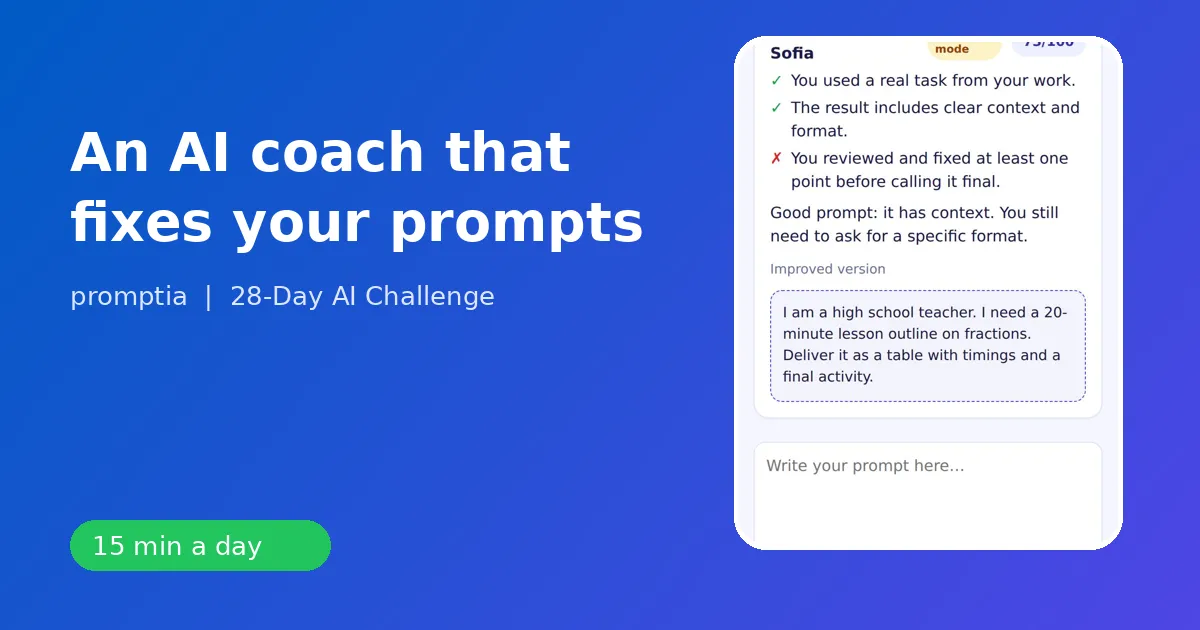
An AI coach for learning AI reviews the prompt you wrote, tells you what is missing and suggests a better version, so you get feedback on every exercise instead of practicing alone. The reason it matters is simple: the biggest obstacle for beginners is not knowing whether their prompt is good, and a vague answer from the assistant does not tell them.
This guide explains what a coach does, what a feedback loop looks like on a real exercise and how the coach inside 28-Day AI Challenge from Promptia is set up.
The problem feedback solves
When you practice a skill alone, you repeat your own mistakes. With prompts the mistakes are quiet. A weak prompt still returns an answer, so you think you did fine. You never find out that a role, a constraint or a format would have made the result twice as useful.
A coach closes that gap. You write, it responds, you rewrite. That is how athletes, musicians and writers improve, and prompting is no different.
What the coach reviews
For each exercise the coach looks at the same things:
- Role: did you say who the assistant should be?
- Context: did you give the facts it cannot guess?
- Task: is it one clear request or three tangled ones?
- Format: did you say what the result should look like and how long?
- Reality: is the prompt about a real task from your job?
An example loop
The day-2 exercise asks you to build a prompt with role, context, task and format for a real task. Suppose your first attempt is:
Write an email to my client about the project.
The coach points out that the role, the situation and the format are missing and asks what outcome you want. You rewrite:
You are a project manager at a small agency. The client's website launch moves from Friday to the following Wednesday because of a late asset. Write a friendly email of about 120 words that explains the reason in one sentence, gives the new date and asks for approval of the revised plan.
The difference in the assistant's answer is immediate, and you have just learned why. The coach did not write it for you. It showed you which ingredients were missing.
Why a daily limit
The coach is an AI assistant, and in 28-Day AI Challenge it has a daily usage limit per user. That is a feature, not only a cost control. Limited feedback pushes you to attempt the exercise on your own first and use the coach on the version you are least sure about. It keeps the daily session within 15 minutes.
The rest of the daily loop
A day in the plan has a fixed shape:
- A micro-lesson of 10 to 15 minutes in total, split into three short ideas.
- An exercise with a starter prompt and written success criteria.
- A two-question quiz.
- Optional coach feedback on your prompt.
- A badge unlock and the streak counter.
The success criteria are plain: you used a real task, the result has clear context and format, and you reviewed and corrected at least one point before calling it final. The coach checks your attempt against the same list, which keeps feedback consistent.
What a coach cannot do
Be clear about the limits. A coach cannot verify facts in your field, it does not know your company's rules unless you state them and it does not replace review by a colleague for important documents. It is a practice aid for a skill, writing prompts, and the verification habit stays with you. Day 6 is dedicated to spotting hallucinations because this is the one skill nobody can outsource.
Who benefits most
- Complete beginners who are not sure whether they are doing it right.
- Self-taught users who have developed habits and want a second look.
- Professionals with little time, who need quick, specific feedback and not a long tutorial.
- People who dropped other courses because nobody ever told them how they were doing.
How to get the most from feedback
Do the exercise first and write your best attempt. Paste it into the coach and read the feedback slowly. Make one change, not five, and test it in your assistant. Save the version that works in your prompt library, the subject of day 7. Over the 28 days your first drafts will need less correction, which is your own measure of progress.
Compare with other ways to get feedback
| Option | Pros | Cons |
|---|---|---|
| A friend or colleague | Knows your context | Rarely available daily |
| A live course or tutor | Human judgment | Fixed schedule, higher cost |
| Forums and communities | Many viewpoints | Slow and inconsistent |
| An AI coach inside the plan | Instant, tied to the exercise | Daily limit, no domain verification |
The best setup combines the coach for daily reps with a colleague who reviews your most important outputs.
Keep reading
For the skills the coach checks, see the prompt engineering guide. To see the whole daily structure, read the AI tutor app guide. If you are still comparing options, the beginner course checklist is a good starting point, and how to use Claude AI shows the same feedback habit applied to a specific assistant.
Feedback is what turns practice into skill. Make it daily, specific and tied to your own work.
A second example: feedback on a summary prompt
On day 5 the exercise is to summarize a long text and extract what matters. A typical first attempt is: Summarize this article. The coach would flag that there is no audience, no length and no structure. A stronger version reads: You are an analyst preparing a briefing for a manager with two minutes. Summarize the article below in five bullets, then list the three numbers that matter and one question I should ask the author. Notice what changed: a reader, a limit, a structure and a purpose. After a handful of cycles like this, you start writing the stronger version on the first try, and the coach becomes a quick final check instead of a rescue.
How to know the coach is helping
Keep a simple record for two weeks. Each day, note whether your first draft needed one change or several. By the end of week two the number should drop. That drop is the skill forming, and you can see it without anyone's say-so.